
New this weekPrint shop for sponsor banners · GameChanger schedules and stats · League Hub Assistant · App 1.0.8 on Google PlaySee what’s new →

One place to run
your whole league.

Fields, practices, lineup cards, sponsorship money, the rule book and player evaluations — on the web and on every coach’s iPhone. The day-to-day and the year-to-year, for a volunteer board that has about an hour a week to give it.

Running little leagues since 2022.

6
Modules
iPhone
+ the web
Yours
Colors & logo
None
Contract
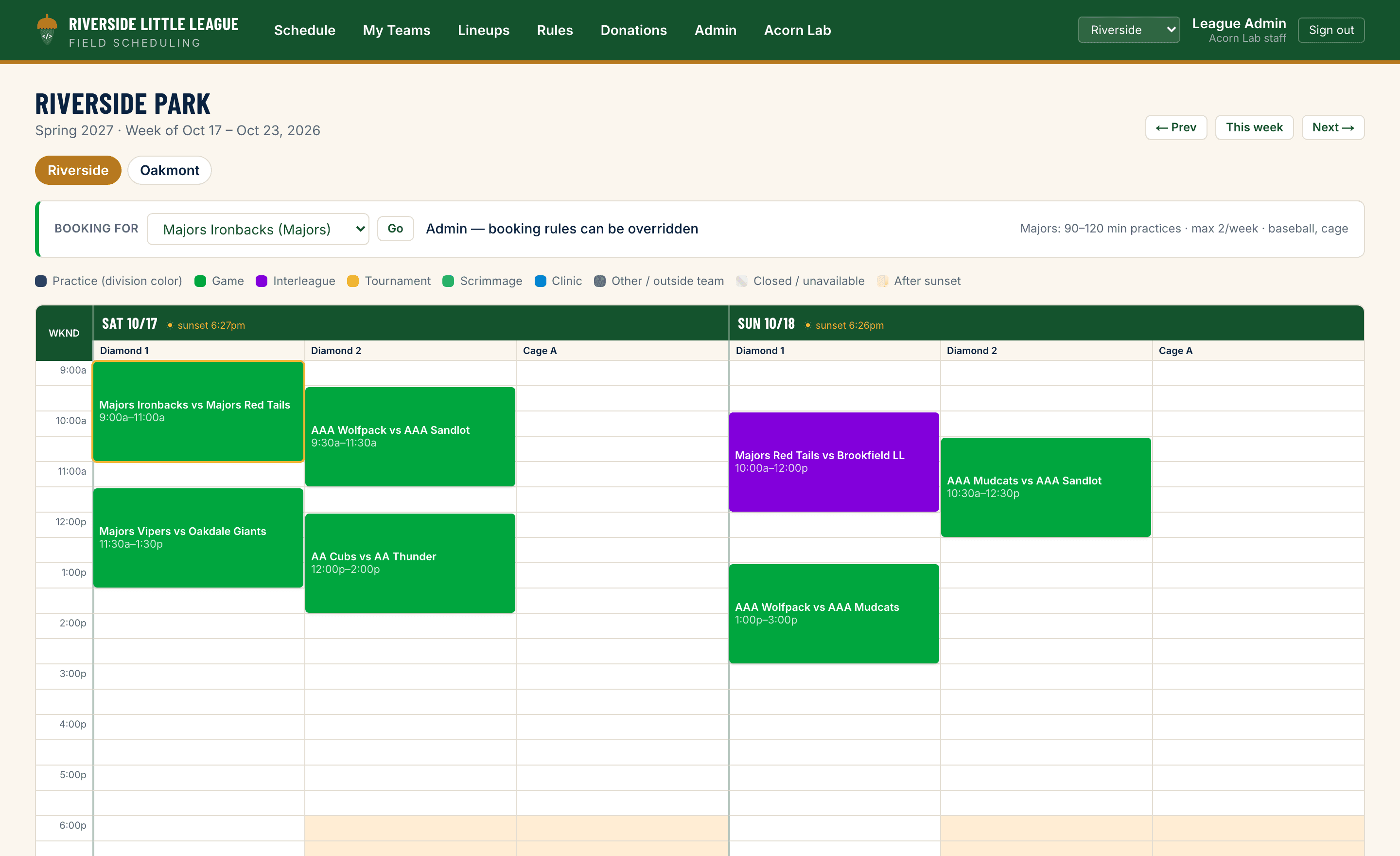
A week of a league's schedule: Saturday and Sunday games across two diamonds, weeknight practices colored by division, and the hours after sunset shaded out on the field with no lights.

One week at a demo league. Games at the weekend, practices on weeknights, and the hours after sunset shaded out on the diamond that has no lights.

Day to day

Who's on which field tonight, who's batting third, what the local rule says.

Season to season

Sponsors who renew, evaluations that carry forward, a schedule you don't rebuild from scratch.

One sign-in

The board sees everything. A coach sees their own team. No second app, no second password, no shared Gmail login passed around.

Six things the board stops doing by hand

Turn on what your league needs and ignore the rest. The point is that a team name, a sponsor and a player get typed in once — not into four different sheets by four different people.

01 · Money in

Run the sponsorship drive, not a spreadsheet

Set your tiers once. Track every sponsor from pledge to paid to thank-you, see what each tier has actually raised against your goal, and when it's time to ask again, the list builds itself — last year's sponsors who haven't come back yet, already sorted.

  • Tiers, pledges, payments and refunds on one ledger
  • Renewals: last year's sponsors who haven't come back yet
  • Email all of them, only the paid, only the unpaid, or just the lapsed — names and amounts fill themselves in
  • Import the donor list you already keep, from Excel or Google Sheets

02 · From gift to outfield

A sponsor pays. The banner is already queued.

Log the gift, drop their logo on the record, and the rest queues itself: banner to print, social post to run, receipt to send. Each one falls off the list when it's done. Nobody is scrolling back through April's emails in June working out who paid for the left-field banner.

  • Their logo lives on the sponsor record, print-ready, for as long as they sponsor you
  • One queue for banners, social posts and receipts
  • Printed and sent dates recorded, so the board can see what's still outstanding

03 · The hard part

Your fields and cages, booked without the group text

Put your fields and cages in once, with the hours they're really open. Block out holidays, school use and the weeks the grass is being re-seeded. Then open booking to the coaches and stop being the switchboard — Majors picks Monday, Minors Tuesday, Tee Ball Wednesday, in whatever order your board decides.

  • Coaches book their own practices — on the web or the iPhone app — inside the length, the weekly limit and the field types you set for their division
  • You pick which divisions book first, and when each window opens and closes
  • Wish lists: a coach ranks three weekly times ahead of time, and the moment their window opens League Hub books the first one that's free — or the closest thing to it — and tells them what it got
  • Rain-out in one tap: close fields for the rest of the day, cancel the practices in the way and notify every team affected
  • Blackouts for holidays, school use and closed fields; an unlit field won't take a slot that runs past sunset
  • Two coaches clicking the same slot can't both get it, and nobody books over a game
  • A slot frees up and the team that asked for it first gets emailed, automatically
  • Schedulers can bend a rule when it makes sense — with a reason, logged, and flagged to the rest of the board when it's their own team
  • Every team gets a calendar feed that updates itself, plus a GameChanger export

04 · Saturday morning

The lineup card, built on the phone in your pocket

Pick the game, set the batting order, tap a position for every kid in every inning — or let auto-fill rotate positions and bench time fairly, then set your pitcher and catcher. It warns you the moment two kids are at shortstop in the same inning.

  • Built start to finish on the iPhone app or the website — they're the same card
  • Flags double-ups and uncovered positions as you build; bench innings counted per player
  • Prints four copies to one landscape page — dugout, umpire, other dugout, scorekeeper
  • A plate-meeting card for any inning: name, number and position, four to a page
  • Roster on the phone, with each player's batting spot and positions for the next game

05 · Year to year

The rule book everyone can actually find

Your local rules, searchable by division and category, so the answer at 7pm on a Tuesday takes ten seconds. Player evaluations are scored on a phone at tryouts and kept season to season.

  • Local rules searchable by division and category
  • Evaluation sessions scored at the field, averages by season

06 · Every coach's pocket

The iPhone app: game day without the group text

League Hub is on the App Store. A coach opens it and their next game is right there — time, field, lineup card, roster — with practices to book underneath. Board members flip one switch from My team to League and get the whole park and the scheduler's tools.

  • Game-day card: today's game or the next one, one tap to the lineup and roster
  • Book practices from the phone, with the whole park or one field at a time
  • Push notifications for rain-outs, reopened windows and wish-list bookings
  • Team pages with schedule, roster and lineups; the rule book filtered by division
  • League view for board members: field board, booking windows, teams short of practices, rain-out and reopen

Straight answers

The questions a board has to answer before it can put this on an agenda.

Who did what

Every booking, cancellation, override and admin change is in the audit log with a name and a time — and every tap in the iPhone app too. Overrides are highlighted, and one made on a scheduler's own team is emailed to the rest of the board the moment it happens.

What we hold on your players

A name and a jersey number. That is the whole player record — no birthdays, no addresses, no parent phone numbers, no photos, nothing medical. Evaluations are scores against a name. A coach sees only their own teams, and the board decides who can see the sponsor money.

Getting your season in

Upload the sheet you already keep. Teams and the master schedule both import from Excel or a shared Google Sheet — including a workbook with separate tabs for fields and cages — and we show you every row we could and couldn't place before anything is saved.

Your data, if you leave

It's yours. Donors, the master schedule and per-team calendar feeds all export, and we'll hand over the rest on request. There is no lock-in clause because there is no contract to put one in.

Taking the money, not just tracking it

Acorn Lab connects to your league's own Stripe or Square account, so a sponsor can pay straight from the ask and the gift reconciles itself against your ledger — pledged, paid and still owed, without anyone re-keying it. The money lands in your league's account. We never hold your funds and we don't take a cut of them.

Works withStripeSquare

Want it for your league?

Twenty minutes and we’ll show it running on your fields, your divisions and your rule book — your colors and last year’s sponsor list already loaded, so you’re looking at your league and not a demo.

We know this goes to a vote, so the page above is written to be forwarded — what it does, and what it doesn’t do yet, in one place.